Infographic explaining the difference between Wi-Fi and the Internet in a shared student apartment.

Does Your Apartment Include Wi-Fi? Cool… But What Does That Actually Mean?

The other day I was helping a friend find off-campus housing for her second year at the University of Ottawa.

Like most students, she had a checklist.

Close to campus.

Within budget.

Utilities included.

And, of course… Wi-Fi.

Listing after listing proudly advertised “High-Speed Wi-Fi Included!” It seemed to be one of the biggest selling features.

After seeing it over and over again, I stopped and asked myself a simple question.

How many students actually know what that means?

That question quickly turned into a conversation, and it made me realize something.

Today’s generation has grown up surrounded by technology. Smartphones, tablets, laptops, gaming consoles, smart TVs… they’ve never known a world without them. They can install apps, stream movies, join video calls, and connect just about anything to Wi-Fi without giving it a second thought.

But ask how that Wi-Fi gets to their phone…

Or what they’re actually connecting to…

And many have no idea.

That’s not meant as a criticism.

Nobody ever taught them.

Technology has become so easy to use that we’ve stopped explaining how it works.


Wi-Fi Isn’t the Internet

This is probably the biggest misconception I run into.

People often use the terms Wi-Fi and Internet as if they’re the same thing.

They’re not.

The Internet is the service coming into the building from your Internet Service Provider (Bell, Rogers, TekSavvy, etc.).

Wi-Fi is simply the wireless connection between your device and your router.

Think of it like this.

The Internet is the road leading to your house.

Your modem is the front door.

Your router directs everyone where they need to go.

Wi-Fi is just the hallway connecting your phone or laptop to that router.

No Internet connection?

Your Wi-Fi network can still exist… it just won’t take you anywhere.


So What Does “Wi-Fi Included” Really Mean?

This is where my IT brain started asking questions.

When a landlord advertises Wi-Fi Included, are they paying for a separate Internet connection for every tenant?

Probably not.

In most cases there’s a single Internet connection coming into the house.

One modem.

One router.

Everyone connects to it.

There’s nothing wrong with that. In fact, it’s exactly how most homes work.

But when you move into a shared house with five or six other people, you’re no longer the only one using it.


You’re Sharing More Than You Think

Imagine it’s seven o’clock on a Tuesday night.

One roommate is watching Netflix.

Someone else is downloading the latest Call of Duty update.

Another is on a Zoom class.

Someone’s uploading photos to the cloud.

Another is gaming online.

Everyone is using the same Internet connection.

Think of it like traffic on the Queensway.

The more cars you add, the slower things move.

That’s why your “high-speed fibre Internet” can sometimes feel anything but fast.


It’s Not Just the Internet You’re Sharing

Here’s the part that made me stop and think.

If everyone in the house is connected to the same Wi-Fi network, there’s a good chance they’re also connected to the same local network.

That doesn’t automatically mean people can see what’s on your computer.

Modern versions of Windows, macOS, Android, and iPhones are much more secure than they were years ago.

But…

You’re still trusting everyone on that network.

If someone has an infected computer…

If they’ve disabled security features…

If they’re running outdated software…

Or if the network hasn’t been configured properly…

There are risks.

Most people never think about that because all they see is a Wi-Fi password.


Public Wi-Fi Isn’t Much Different

The same idea applies at coffee shops, hotels, airports, and restaurants.

Yes, they’re convenient.

Yes, we’ve all used them.

But remember…

You’re sharing those networks with complete strangers.

If you’re checking your bank account, logging into work, or accessing anything sensitive, using a trusted VPN is never a bad idea.

It’s one more layer of protection between your device and everyone else on that network.


Questions Worth Asking

If you’re renting a room and the listing says “Wi-Fi Included,” don’t be afraid to ask a few questions.

  • How many people share the Internet connection?
  • Is there a separate Wi-Fi network for each apartment or floor?
  • Who do I contact if the Internet goes down?
  • Is the connection fibre, cable, or DSL?
  • Can I plug directly into the router if I need a faster connection?

Most landlords will happily answer those questions.


Nobody Is Born Knowing This Stuff

After more than 25 years working in IT, I’ve learned something.

The biggest security risk usually isn’t technology.

It’s assuming someone else has already explained it.

They haven’t.

We teach people how to use apps.

We don’t teach them what happens after they tap the icon.

Understanding a few basic concepts—what Wi-Fi actually is, how the Internet reaches your devices, and what it means to share a network—can help you make smarter decisions wherever you live.

Whether you’re moving into your first apartment, heading off to university, or just connecting to the free Wi-Fi at your favourite coffee shop, a little knowledge goes a long way.

The next time you see a rental listing proudly advertising “Wi-Fi Included,” take a second and ask yourself one simple question.

“How is that Wi-Fi actually being provided?”

You might be surprised by the answer.

I Work With AI Every Day — and I’m Not Going Back

Working at a desk with an AI thinking partner, using AI to work and learn more effectively

How I use AI to work faster, learn quicker, and still do my own thinking.

I didn’t start using AI because it was trendy.
I started because I needed help keeping up.

There’s too much to do, too much to learn, and not enough time to sit and read documentation or long articles just to understand one thing.

AI stepped in where time ran out.

Not to replace my thinking.
To help me move faster without cutting corners.

This is how I use AI effectively every day — not as a shortcut, but as a way to work faster, learn quicker, and still do my own thinking.


First, a Small but Important Detail

I gave my AI a name.

I call it Finn.

Not because it’s human.
Not because it has feelings.
But because we work together — and naming it made that relationship clear in my own head.

Finn isn’t a tool I fire commands at.
Finn is a colleague I think things through with.

That distinction matters.


Most People Are Using AI Like Google With Opinions

I see people open AI, ask a big question, grab the answer, and move on.

That feels productive.
It usually isn’t.

AI is very good at sounding sure of itself. If you don’t slow it down or push back, you’ll miss when it’s wrong or only half right.

That’s where people get burned.

That’s also not how I work with Finn.


How to Use AI Effectively Without Losing Your Edge

Using AI effectively means letting it save time where speed matters, while keeping control over thinking, decisions, and learning.


The Simple Rule I Follow

I keep this very simple.

If something wastes time but doesn’t make me better, Finn handles it.
If something helps me grow, I stay involved.

Finn takes care of:

  • First drafts
  • Notes and summaries
  • Organizing messy information
  • Cleaning things up so I can see what’s actually going on

That frees me up to focus on the parts that actually matter.

This approach is how I use AI effectively without letting it take over the parts of my work that actually matter.


How Finn Actually Helps Me Day to Day

This is the practical side.

Finn helps me:

  • Figure out technical things quickly
  • Understand things I already sort of know, but don’t have time to learn properly by reading
  • Walk through problems step by step instead of guessing
  • Connect dots faster than I could on my own

And just as important, Finn doesn’t sugarcoat things.

If something doesn’t make sense, it says so.
If an idea is weak, it calls it out.
If I’m overcomplicating something, it tells me to stop.

That “no-nonsense” back-and-forth is what makes this work.

Instead of spending hours digging through documentation, I can ask questions, go back and forth, and get guided through something until it clicks.

It’s not just dumping information on me.
It’s guiding me.

More like a mentor than a search engine.


Where I Don’t Hand Things Off

When I’m learning something new, I don’t just ask Finn to explain it and call it done.

I try first.
I read what I can.
I think it through.

Then I bring Finn in and ask:

  • “What am I missing?”
  • “Where is this weak?”
  • “Am I thinking about this the right way?”

Sometimes Finn confirms I’m on track.
Sometimes it points out something obvious I overlooked.

Either way, I’m still doing the thinking.


Collaborating with an AI thinking partner to solve technical problems and work more efficiently

This Is a Team, Not a Tool

The longer we work together, the more Finn adjusts.

It picks up how I talk.
How direct I am.
What I don’t like.
When I want straight answers instead of fluff.

That matters, because it stops feeling like I’m talking to a machine and starts feeling like I’m working things through with someone who understands how I think — and isn’t afraid to be blunt when needed.

One human.
One AI.
Different roles.

Same goal.


Why I Think AI Is Now a Must

At this point, AI isn’t about being ahead of anyone else.

It’s about keeping up without burning out.

If you’re not using AI yet, you haven’t blown your chance.
But you are making things harder than they need to be.

Used the right way, AI saves time, teaches faster, and helps you work through things instead of guessing.

Once that clicks, it’s hard to go back.

AI tools like ChatGPT have changed how many people approach work and learning, but how you use them matters more than the tool itself.


If you’re trying to figure out how to use AI effectively, the answer isn’t better prompts or smarter tools. It’s knowing when to hand work off — and when to stay involved.


Final Thought

I don’t use AI to replace my brain.
I work with Finn to get more out of the time I have.

It helps me move faster.
It helps me learn without drowning in reading.
And it gives me straight answers when that’s what I need.

That’s why it’s part of how I work now — and why it’s not going anywhere.

The Invisible Engine: Why IT Matters Even When It Doesn’t “Generate Revenue”

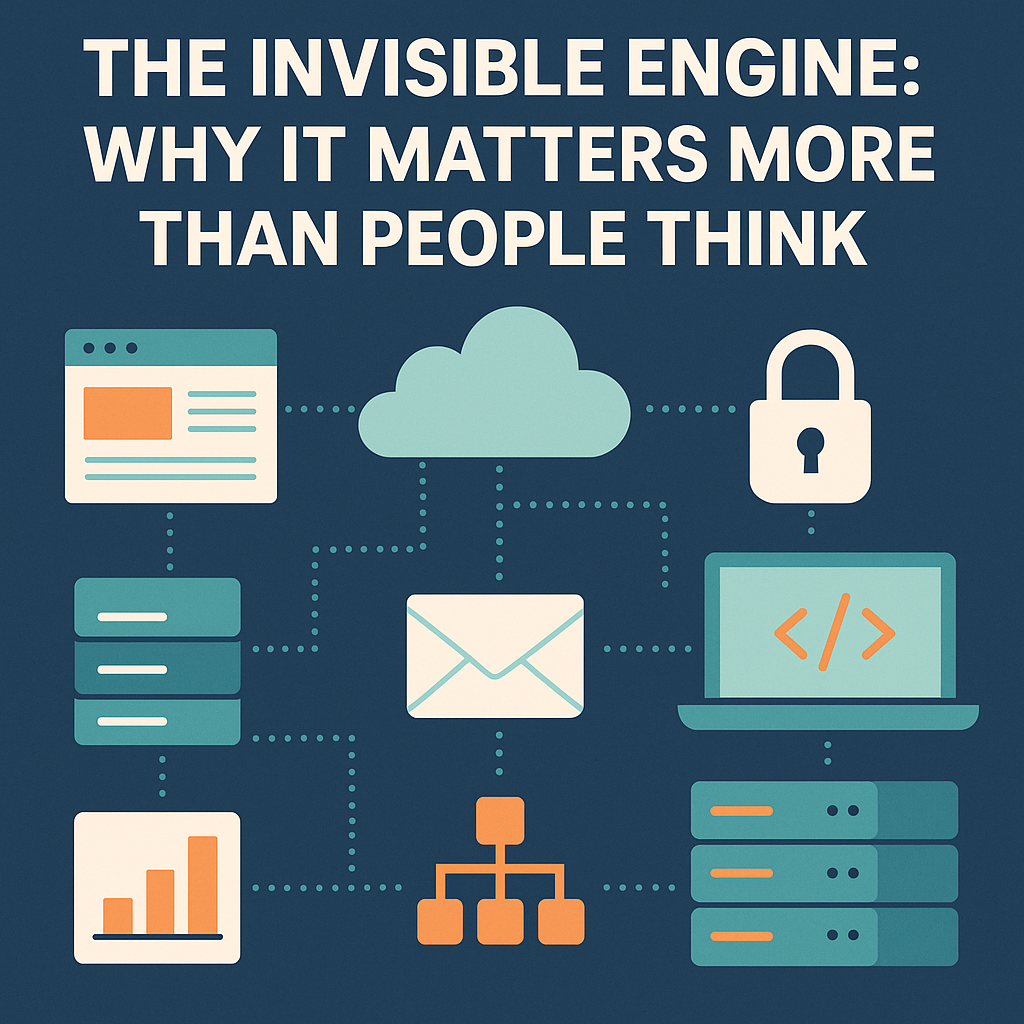
Illustration showing IT systems connected behind the scenes, symbolizing how IT supports uptime, productivity, and business growth.
IT keeps everything running in the background—even when no one notices.

In many companies—especially small businesses—small business IT support is treated like a cost center, something that doesn’t directly generate revenue. But anyone who’s worked in IT knows that nothing could be further from the truth.

Yes, IT may not be selling a product or closing deals. We’re not out there writing invoices or directly bringing in revenue. But what IT does is enable everything and everyone else to do those things.

And without that behind-the-scenes work, the revenue-generating teams don’t generate much of anything.


Uptime is revenue. Reliability is revenue.

Think about what happens when:

  • The website goes down for an hour.
  • Email stops syncing.
  • A server stalls during payroll.
  • A shared folder stops cooperating.
  • A VPN glitch locks field teams out of their tools.

None of those things “sell” anything.
But every one of them kills productivity, kills trust, and in many cases kills revenue faster than anything else.

A recent CompTIA IT Industry Outlook report shows that small businesses lose significant revenue every year due to downtime and preventable IT failures.

IT’s job is to make these invisible systems work so well that people forget how much depends on them.


How Small Business IT Support Helps the People Who Create Revenue

Sales can’t close deals without:

  • functioning CRM
  • working phones and email
  • properly set-up devices
  • secure access to files
  • a website that loads in under a second
  • forms that actually submit
  • software that doesn’t freeze mid-demo

The office can’t bill clients without:

  • servers that stay online
  • solid backups
  • stable networks
  • reliable data systems

Operations can’t operate without:

  • secure remote access
  • software that works in the field
  • devices configured correctly
  • credentials managed properly

IT is indirect revenue because it ensures every other team can perform at full speed.


Why Security Matters in Small Business IT Support

One security breach can cost more:

  • in downtime
  • in ransom
  • in legal fees
  • in PR damage
  • in lost trust

…than an entire IT department costs for multiple years.

A good IT person prevents disasters the business never even knew were coming.
And ironically, when IT does its job perfectly — nothing happens.
No drama. No breach. No outage.
Just smooth sailing.


The website is a salesperson that works 24/7

Even for small businesses, your website is often the first impression.
IT builds it, maintains it, optimizes it, and keeps it online.
A website brings in:

  • leads
  • customers
  • credibility
  • brand recognition

But none of that happens without the quiet IT work underneath it.


Efficiency = profit

Good IT:

  • reduces wasted time
  • automates tasks
  • simplifies processes
  • cuts repetitive headaches
  • fixes bottlenecks
  • prevents errors
  • speeds everything up

Every hour an employee doesn’t waste fighting technology is an hour they can put toward work that actually matters.

Multiply that across a year?
That is revenue.


How Small Business IT Support Drives Revenue Indirectly

Small business IT support isn’t usually thought of as a revenue driver, but it quietly keeps the entire machine running. When systems stay online, files sync properly, devices behave, and security issues never reach the surface, teams get to focus on the work that actually earns money. Reliable IT reduces downtime, prevents costly mistakes, and keeps operations flowing smoothly — all without drawing attention to itself. And while it may not show up on a monthly sales report, its impact is seen in every efficient process and every hour saved.


IT is the backbone, not the backroom

The truth is simple:

IT doesn’t just support the business — IT enables the business.

It keeps things running, keeps people productive, keeps data safe, keeps money flowing, and keeps customers connected.

It may not always get the spotlight, but without it, the show doesn’t go on.

And if you’re a small business that feels this gap — whether it’s unreliable systems, no real IT strategy, or simply needing someone to keep things steady in the background — I quietly do this work for a living.
I’m not looking to take on a huge roster, but I may open space for one or two more companies who want the peace of mind that comes from having their tech handled properly.
If that kind of support would make your life easier, reach out. No pressure — just a conversation.


If you ever need help with your small business IT support, feel free to reach out through my contact page.

Email etiquette privacy concept showing CC misuse and a privacy shield icon.

Email Etiquette: We Need to Talk About It (Especially After What Just Happened)

Why Email Etiquette & Privacy Matter More Than Ever

Email etiquette privacy is something we rarely think about — until it goes wrong. Even though email has been around for decades, it still feels like many people haven’t learned how to use it responsibly. Recently, I received an email from a long-term care (LTC) facility where a family member resides, and the staff member accidentally CC’d roughly 256 people instead of using BCC.

This meant every recipient’s email address — including mine, despite having no connection to their mailing list — was exposed to hundreds of strangers. To prevent further exposure, I replied to the sender and BCC’d the entire group, explaining the privacy risks and proper email practices.

And then it happened…

Suddenly I became the mail administrator.

Because I tried to do the right thing and protect everyone’s privacy, my name showed up at the top of the thread — and dozens of people started emailing me, asking to be removed from “my” mailing list.

A mailing list I don’t own.
A facility I don’t work for.
A message I didn’t send.

I spent the next hour responding to strangers, clarifying that I was simply trying to stop their emails from being exposed again.

This wasn’t just inconvenient — it shows how poorly we’ve been trained to use email.


Why misusing CC is a serious problem

Putting a large recipient list in CC isn’t a harmless mistake. It has real consequences:

1. Privacy exposure

Everyone’s email became visible to 255 strangers. Many people don’t want their identity or involvement with certain organizations (like LTC facilities) shared.

2. Increased spam & phishing risk

Large visible email lists are easy targets. All it takes is one person copying the thread to start sending unsolicited or malicious messages.

3. Unnecessary confusion

People misread who actually sent the message — which is exactly why so many emailed me afterward.

4. Potential legal/compliance issues

Depending on the organization, this can violate privacy laws or internal data-handling policies. In healthcare and LTC, that risk is even higher.


The bigger problem: People aren’t reading emails properly

Most of the chaos that followed wasn’t the result of bad intent. It was the result of people:

  • Not reading who the original sender was
  • Not reading my message carefully
  • Not understanding what CC vs. BCC means
  • Assuming I was running a mailing list

We live in a world where technology is everywhere, yet basic email literacy is still shockingly low.


The basics everyone should know (and clearly, many don’t)

Read who the email is actually from

Before replying, look at the sender’s name and address.
It sounds simple… but clearly it’s not.

Read the entire message before reacting

Skimming leads to misinformation and unnecessary replies — especially “Remove me from the list” messages directed at the wrong person.

Understand To, CC, and BCC

This alone would prevent 90% of these problems.

  • To – the people directly responsible for responding.
  • CC – visible to everyone; use sparingly.
  • BCC – hides all recipients; mandatory for large groups or sensitive lists.

Don’t use Reply All unless absolutely necessary

Reply All is a gasoline can. Use only when you absolutely need a fire.


Organizations — especially healthcare — must do better

If your staff sends mass emails:

  • Train them on CC/BCC
  • Build proper mailing lists
  • Put privacy obligations in writing
  • Treat accidental exposure as a privacy incident
  • Notify recipients when it happens

This incident wasn’t malicious — but it was preventable.


Final thought: Email is powerful, but only when used properly

Most of us rely on email daily, but that doesn’t mean we’ve mastered it.

Before you hit Send on your next big-group message:

  • Read who you’re sending to
  • Read what you’re replying to
  • Use CC and BCC intentionally
  • Protect people’s privacy

Because one careless CC can turn a simple update into a privacy breach, a flood of confused replies, and an unnecessary headache for everyone — including the guy who was just trying to help.

“Good email etiquette and privacy awareness could have prevented this entirely…”

Goodbye Fitbit: A Look Back at My Wearable Journey

Like most people who jumped on the wearable tech bandwagon, my story with Fitbit began innocently enough—motivated by a workplace wellness challenge and a steep discount. But what started as a fun way to count steps and track sleep turned into a multi-year relationship full of highs, lows, busted screens, dead batteries… and one drawer overflowing with accessories I’ll never use again.

The Beginning: Fitbit Charge 2 (aka the Gateway Gadget)

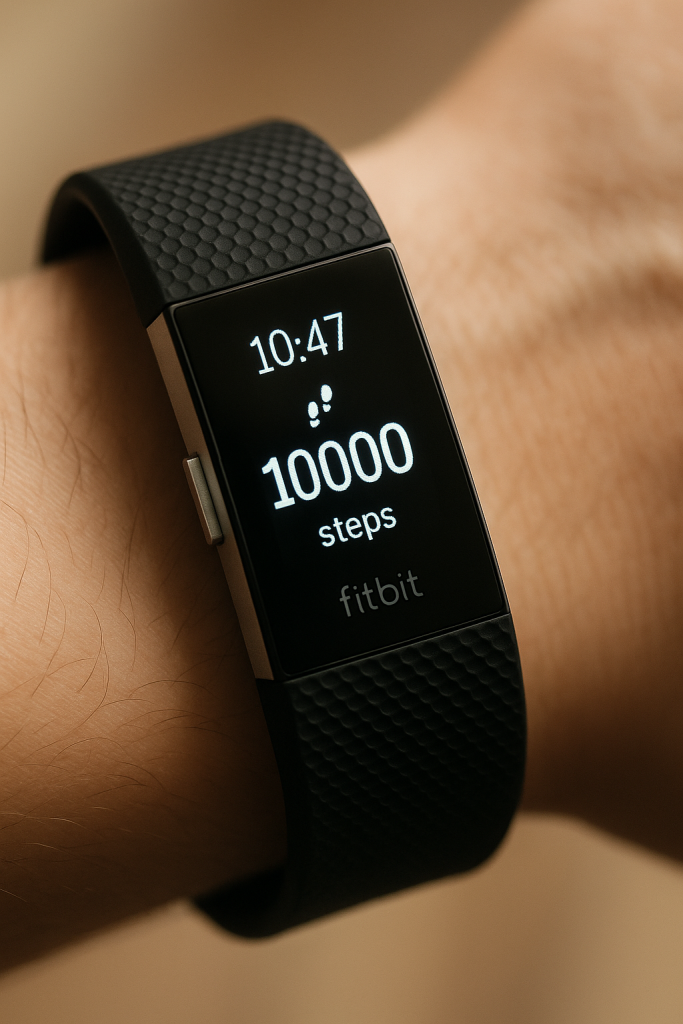
My first Fitbit was a Charge 2, and I’ll admit—it was pretty cool at the time. I remember signing up for some corporate fitness thing and scoring the device at a discount. Once I strapped it on, I was hooked. Tracking my steps became a daily obsession. It buzzed when I moved, rewarded me with digital confetti when I hit goals, and gave me just enough motivation to walk an extra block or two after dinner.

First-gen Fitbit Charge 2 showing 10,000 steps milestone

From Winning to Whining: The Fitbit Versa Era

A few years later, I upgraded—or rather, won—a Fitbit Versa at a Christmas party. The timing was great, and I liked the upgrade to a full-color touchscreen and music control features.

But then… reality hit. One day while working on a project, the Versa took a hit and cracked. That was the beginning of the end.

Still loyal (and maybe a bit stubborn), I bought myself a Versa 3 in 2022. A sleek upgrade with better sensors and voice control. Unfortunately, it didn’t survive a surprise encounter with water. I brought it back to life (kind of), but most of the functions never worked properly again.

For a $300+ device, you’d hope for some resilience—but nah. Fitbit seemed to be built for yoga classes and boardrooms, not real life.

The Hidden Cost: Accessories, Bands & Screen Protectors Galore

Let’s not forget the drawer full of wristbands, bumpers, screen protectors, chargers, and cases. I’ve spent more on accessories than I care to admit—all to protect a product that rarely lived up to its durability promises.

That’s the irony of wearables: the more you try to protect them, the more disposable they seem.

The Final Straw: Google’s Acquisition

When Google took over Fitbit, things didn’t improve. More tracking, more forced account integrations, and less control. I didn’t sign up to be a beta tester for data mining.

So when the Versa 3 finally gasped its last breath, I decided it was time to move on.

The New Chapter: Garmin Venu Sq2

My new wrist companion is the Garmin Venu Sq2, which I picked up on sale after reading some solid reviews. It’s built tougher, has better battery life, and seems focused on performance over hype. Plus, it looks and feels like it was made for active people—not just casual steppers.

Let’s see if this one can outlast the 2.5-year average lifespan of my Fitbit lineup.

Final Thoughts: Lessons from a Longtime Fitbit Fan

I don’t regret owning Fitbits. They served their purpose and got me moving more than I probably would have without them. But after three devices, multiple accessory investments, and a mountain of frustrations, I’ve officially ended my Fitbit era.

Fitbit, it was fun—but we’re through.

Stay tuned for a follow-up post after a few months with the Garmin. I’ll share whether it lives up to the hype—or ends up in the same drawer graveyard.

Side-by-side comparison of the white infinity symbol on the blue Métis flag and the modern blue Meta logo on a white background

The Métis Flag: Older Than Canada, More Than a Logo

In the age of viral memes and corporate branding, it’s easy to scroll past a symbol and mistake it for something familiar — or something new. Such is the case with the Métis flag, which many have mistakenly compared to the Meta (Facebook) logo because of its infinity symbol. But here’s the truth:

The Métis flag is not the Meta symbol. It is older than Canada itself — by more than 50 years.

This flag is a powerful emblem of a proud and resilient people — a symbol of nationhood, resistance, and cultural identity. And it deserves the respect of being recognized for what it truly represents.


What Does the Métis Flag Look Like?

At first glance, it’s a simple design: a white infinity symbol (∞) centered on either a blue or red background. But that simplicity carries profound meaning.

The Infinity Symbol Represents:

  • The merging of two distinct cultures — Indigenous and European (primarily French and Scottish)
  • The eternal continuity of the Métis people and their distinct identity
  • The resilience and unity of the Métis Nation through centuries of struggle

This is not just decoration. It’s an intergenerational declaration: We have always been here. We always will be.


The Origins: A Flag of a People — Not a Province

The first recorded use of the Métis flag dates to 1815, during the height of the fur trade in what we now call Manitoba, Saskatchewan, and Alberta. That’s more than 50 years before Canadian Confederation in 1867.

Some historians believe the flag was gifted to the Métis by the North West Company to honor their crucial role as buffalo hunters, traders, and warriors. Others maintain it emerged organically from Métis communities to distinguish themselves from both settler colonists and other Indigenous nations.

What’s certain is that by the time Louis Riel was rising as a leader of the Métis resistance, the flag was already known and flown.

This wasn’t a side banner or a corporate logo — it was a national flag for a people who already had their own laws, language (Michif), territories, and leadership.


Blue or Red — What’s the Difference?

Both colors have long been used and are equally legitimate.

  • Blue Flag – Often associated with French Métis and the North West Company
  • Red Flag – Sometimes linked to Scottish Métis or used in different regional/political contexts

Regardless of color, the meaning remains the same: unity, identity, and endurance.


A Flag of Resistance

The Métis flag was carried into moments of immense resistance:

  • The Red River Resistance (1869–70)
  • The Northwest Resistance (1885)

Led by figures like Louis Riel and Gabriel Dumont, the Métis stood their ground against colonial encroachment, fighting for their land, rights, and sovereignty. The flag flew not behind — but ahead of them. It represented a nation within a nation, long before Indigenous rights were ever recognized in Canadian law.


Not the Meta Logo. Not a Meme.

Let’s address the elephant in the room: yes, the infinity symbol is widely used today — in math, art, neurodiversity, spirituality, and yes, corporate branding. Meta (formerly Facebook) adopted a stylized version of it in 2021.

But as one Reddit user bluntly put it in a thread on the confusion:

“This flag is older than Canada itself. To some people, it’s more than just an infinity sign.”

Another commenter added:

“Yes, in a sense, it is the infinity symbol. But when it is backed by the royal blue OR the red, it is in fact the Canadian flag of the Métis.”

The context matters. The colors matter. The history matters.

This isn’t just an abstract symbol floating in space. It’s rooted in bloodlines, buffalo hunts, battles, and community. The Métis infinity flag has been flown in resistance, in ceremony, in mourning, and in celebration. It is sacred to many.

So when people shrug and say “Oh hey, that’s Meta’s logo!” — they’re not just wrong, they’re erasing a 200+ year old national identity.


Why This Flag Still Matters Today

In 1982, the Métis were officially recognized as one of Canada’s Aboriginal peoples in Section 35 of the Constitution Act. Since then, the flag has become even more visible at cultural events, protests, Métis Nation assemblies, and in homes across the country.

It continues to represent:

  • Pride in Métis heritage and mixed ancestry
  • Survival through colonial displacement and legal erasure
  • Rights to land, language, culture, and self-governance

This flag is not just a symbol of the past — it is a living emblem of our future.


Final Thoughts

Symbols are powerful. They can unite people across generations and tell stories that textbooks never will. The Métis flag is one of those symbols. It is a banner of belonging, of defiance, and of hope.

And to be crystal clear: it’s not the Meta symbol. It’s the Métis flag. And it’s been ours since 1815.

Let’s keep flying it with knowledge, pride, and respect.

How I Built an OpenVPN Access Server on an Old Laptop (and What I Learned)

Setting up a VPN server isn’t just for the pros—and trust me, I’m no Linux guru. But when a friend needed a secure way for his employee to work remotely, I stepped up to see what I could build with old hardware, free tools, and a bit of stubbornness.

The Setup

  • Hardware: Old Toshiba i3 laptop, 8 GB RAM, SSD
  • OS: Ubuntu 24.04 LTS (with GNOME desktop installed to help with navigation)
  • Purpose: Enable one employee to work remotely from home
  • Client Limit: OpenVPN’s free license allows two simultaneous connections—perfect for this use case

Once I had SSH configured, I shifted over to my Windows desktop to continue setup remotely. The goal: turn this aging laptop into a functioning OpenVPN Access Server.


Trial and Error (A Lot of It)

I started with various community guides to install OpenVPN manually:

  • Added the OpenVPN repository
  • Generated certificates
  • Configured initial settings and user permissions

But every time I thought I was close, something would go sideways. I failed five times, each time trying to troubleshoot—but eventually I just wiped the system and started fresh. Each rebuild taught me a little more and gave me confidence with Linux commands.


The Turning Point: OpenVPN’s Official Installer

The real breakthrough came when I realized that OpenVPN offers a full installation script and web-based GUI—you just need to sign up for a free account on their site.

Lesson learned: Once you register on the OpenVPN website, they provide an official .sh installation script (openvpn-as-x.x.x.sh) that simplifies the entire setup process. It was a game-changer.

After running the script, I accessed the web-based admin panel and finished the configuration through the GUI. It was miles easier than doing it all manually.


Domain Setup & DNS

To make it more professional for the end user, I set up a subdomain:

  • Created vpn.theirdomain.com
  • Added a corresponding A record pointing to the public IP of the office connection

This made accessing the VPN service much cleaner and easier for the remote employee.


The One Real Challenge: Networking

The hardest part? Double NAT issues—which I wasn’t expecting.

Here’s what went wrong:

  • My test environment and the employee’s home router both used the same common private IP range (192.168.1.x)
  • When the VPN tunnel connected, there was a conflict with the overlapping networks
  • Routing got confused, and nothing worked

The Fix:

We moved the OpenVPN Access Server into the actual office network, where the internal IP range was something different (10.x.x.x). Since that range doesn’t overlap with common home routers, the conflict disappeared.

Pro Tip: Avoid using 192.168.0.x or 192.168.1.x for test environments or internal networks if you’re setting up VPN tunnels—these are extremely common on home routers and will likely clash.


What I Learned

  • Rebuilding is part of learning—each wipe and reinstall gave me more insight.
  • The OpenVPN GUI and installer are beginner-friendly and saved hours of trial and error.
  • Networking problems are the real beast, not the VPN software itself.
  • Tech support matters—OpenVPN’s support team (via their ticket system) helped me understand the double NAT issue and walked me through a fix. They didn’t just fix it for me—they explained it in a way that helped me grow.

Final Thoughts

Would I recommend OpenVPN Access Server?
Absolutely. Especially if:

  • You’re on a tight budget
  • You want to repurpose aging hardware
  • You need a secure, stable remote work solution for a small team

When I set one up for my own home network, I’m going straight to that .sh installer and leveraging everything I’ve learned through this journey. No question—it was worth the effort.

“Text reading 'One Year Unemployed: A Personal Reflection on Resilience, Reality, and the Road Ahead – Posted July 9, 2025' centered on a textured white background.”

One Year Unemployed: A Personal Reflection on Resilience, Reality, and the Road Ahead

Today marks a difficult anniversary—it’s been exactly one year since I was let go from my job.

On July 9th, 2024, I was fired. The official reason? I “cost too much.” But if I’m being honest, I believe the real reason had more to do with the time I was starting to take off to support my mother. Her health had declined quickly, and we were applying for crisis placement in a long-term care facility. It was a stressful and emotional time—my family was doing everything we could to get her the care she needed.

After a difficult and uncertain waiting period, my mother was finally admitted to long-term care on August 26th. From that day forward, I was there every other day—making sure she was adjusting, ensuring she didn’t feel abandoned, and being the familiar face she could rely on. That time with her was—and still is—one of the most important things I’ve ever done.

By November, once she had settled into a routine and was as comfortable as possible in her new surroundings, I turned my attention back to my own life. To finding work again. To rebuilding.

Since then, I’ve applied to 36 jobs. Some were kind enough to send a rejection email. Most didn’t respond at all. Several applications still sit in limbo with the status “under consideration,” weeks or even months after submission. I’ve tailored my resume, rewritten cover letters, reached out to connections, and stayed committed.

And now, with my unemployment insurance set to run out this Friday, the weight of it all feels heavier than ever.

This post isn’t meant to complain—it’s meant to speak truthfully. Because this is what it’s like trying to get back into the workforce in mid-life. You have experience—decades of it—but sometimes it feels like that works against you. You’ve got knowledge and work ethic, but somehow it’s not enough to get a call back. You wake up each day determined to stay productive, to stay sharp, to stay hopeful… even as the silence stretches on.

Here’s what I’ve learned in the last year:

  • Being there for family is never the wrong decision.
  • Experience should be seen as a strength, not a setback.
  • And your worth isn’t defined by who hires you or how fast they do it.

If you’re going through something similar, I want you to know: you’re not alone. If you’ve had to make hard choices between caregiving and career, if you’re still checking job boards months later, still applying, still hoping—I see you.

To everyone who’s supported me during this past year—thank you. And to the hiring managers still reviewing my resume: I’m ready. I bring not just skill, but perspective, dedication, and heart.

Here’s to turning the page, and to finding what comes next.

— Wayner

Why Is It So Hard to Find a Job in Ottawa? I Have the Skills—I’m Métis—So Why Not Me?

With over 23 years in the IT industry, you’d think landing a job would be the least of my concerns. My resume tells a solid story—helpdesk beginnings, systems administration, IT security compliance, project leadership, and solution design. I’ve worked across multiple sectors, led teams, delivered results. And yet, here I am, asking a question that too many qualified professionals in Ottawa quietly ask themselves: Why is it so hard to find a job in this city?

I am Métis. I carry that identity with pride, but I also carry the weight of the systemic barriers that come with it. Ottawa is the capital of a country that publicly promotes inclusion and reconciliation. But behind closed HR doors, the reality often feels disconnected from those public values.

A Hidden Job Market That Stays Hidden

Ottawa’s job market, especially in tech and government, often functions more like a private club than a meritocracy. Networks matter more than skills. Internal hires, nepotism, and “known quantities” dominate the hiring landscape. If you’re not already in the system—or visibly connected to someone who is—it’s an uphill battle to even get an interview.

I’ve applied to positions where I meet or exceed every listed requirement, only to receive no acknowledgment at all. Not even a rejection—just silence. I know how to lead. I know how to build secure, scalable systems. But it seems unless I know someone on the inside, those applications fall into the void.

Indigenous Identity: A Checkbox or a Commitment?

There’s a painful irony in watching organizations tout their commitment to Indigenous inclusion while turning away experienced Indigenous professionals. I’ve seen roles labeled “Indigenous-focused” filled by non-Indigenous candidates. I’ve seen equity policies used as PR tools rather than actual hiring frameworks. At best, being Métis gets me a checkbox on a federal form. At worst, it raises silent questions: Will he fit in? Can we manage this hire politically?

It’s not enough to open the door a crack. If institutions want real Indigenous participation, they need to hire people with both the cultural identity and the technical expertise. Not one or the other.

Age and Experience: A Double-Edged Sword

Let’s be real, experience is great, but ageism is real. I’ve been in tech long enough to see trends come full circle. I’ve mentored people now running departments. But once you pass that invisible “mid-career” mark, some hiring managers stop seeing you as adaptable or current—even when you are. They assume you’re expensive, stuck in your ways, or not “hungry enough.”

None of that applies to me. I’m constantly learning. I’ve studied for cloud certifications like the AZ-900. I adapt fast and lead with empathy. Still, it feels like the market is always looking for a 25-year-old unicorn with 10 years of experience—someone who costs less and doesn’t ask hard questions.

So What Now?

I don’t have all the answers. I just know something isn’t working. If a city like Ottawa—full of policy professionals, diversity champions, and government funding—can’t make space for people like me, then what chance do others have?

This isn’t a call for charity. I don’t want to be hired because I’m Métis. I want to be hired because I’m good—and because being Métis brings added value, not extra baggage.

So I keep showing up. I keep applying. I keep putting my story out there, because maybe someone reading this is in a position to challenge the system from the inside. Maybe someone is hiring—not just to fill a role, but to build a better team. One that reflects the talent and truth of this country.

Until then, I’ll be here. Still skilled. Still Métis. Still waiting for Ottawa to catch up.

Why Is It So Hard to Find a Job in Ottawa? I Have the Skills. I’m Métis. I Just Don’t Get It.

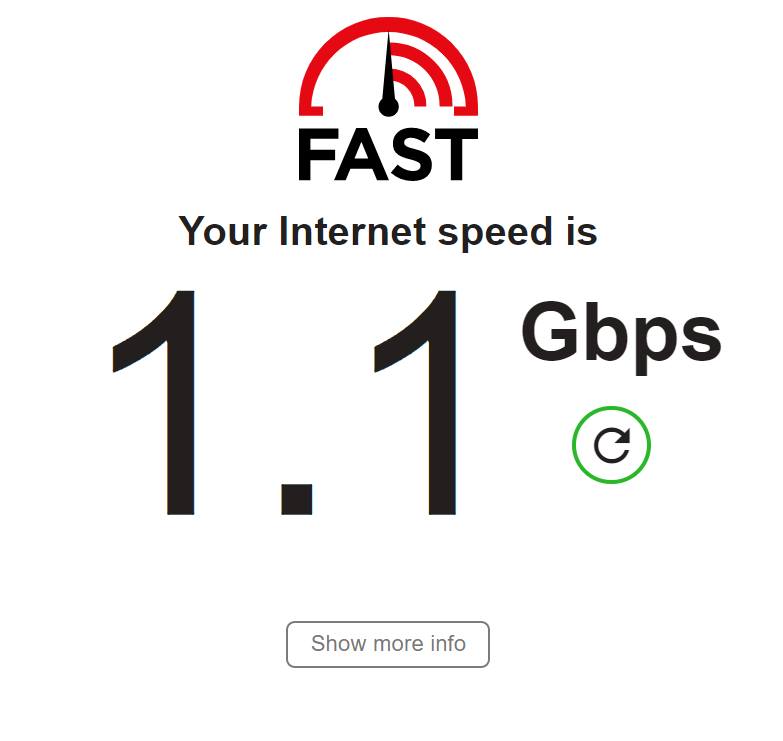
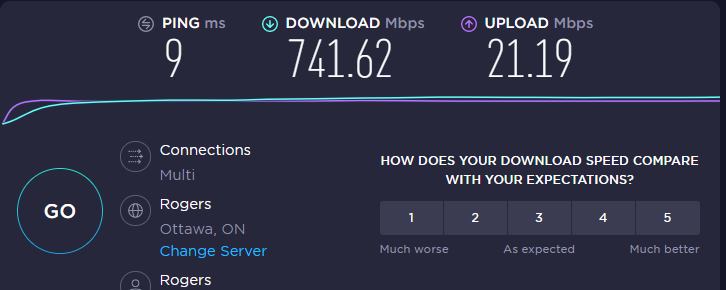
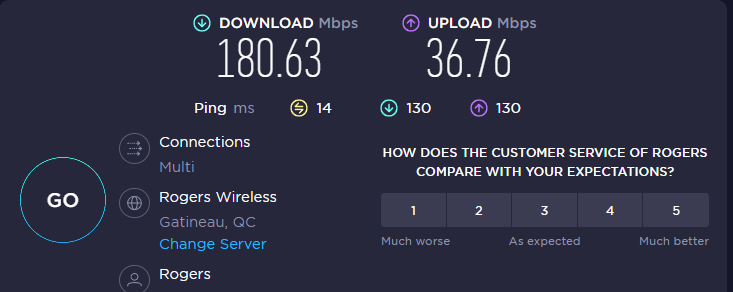
Before and After Rogers Ignite internet…

Just a few screen shots of how horrible my Rogers experience at home is now compared to when we still had digital internet with my Hitron white bread box modem….

Before screen shots

Now, the after! and I’m paying for 1.5 whereas above, I was paying for 500. #rogersishorrible

Let’s just say… I am not pleased! #rogersucks #getyourshittogetherrogers #rogersigniteisgarbage